Wireless video security connects cameras, mobile apps, cloud platforms, and home or business networks. This convenience also creates more entry points for attackers. A camera beside a front door may transmit footage through Wi-Fi, a router, and a remote server within seconds. Each connection needs protection.
The Verizon 2024 Data Breach Investigations Report found that vulnerability exploitation increased by 180% year over year. It also reported that the human element remained involved in 68% of breaches. These findings matter because weak passwords, delayed updates, and careless access sharing can expose video systems. IBM’s Cost of a Data Breach Report 2024 placed the global average breach cost at $4.88 million. A hacked camera may not create that entire cost, but it can reveal routines, private spaces, and sensitive business activity.
So, how to secure wireless video streams from hacking requires more than changing one password. Strong unique credentials, multifactor authentication, encrypted transmission, current firmware, and a separated camera network form the practical baseline. Disable unused remote access. Review login records. Test permissions with a real user account, not only an administrator account.
No system is perfect.
The hard lesson is that security often fails during ordinary moments. An installer may reuse credentials. An employee may approve a suspicious login. A forgotten camera may remain online for years. Guidance from CISA and the NIST Cybersecurity Framework supports continuous asset discovery, access control, monitoring, and recovery. This article explains how wireless video works, where attacks commonly begin, and which safeguards provide measurable protection. It also questions assumptions that sound secure but fail under routine operational pressure.
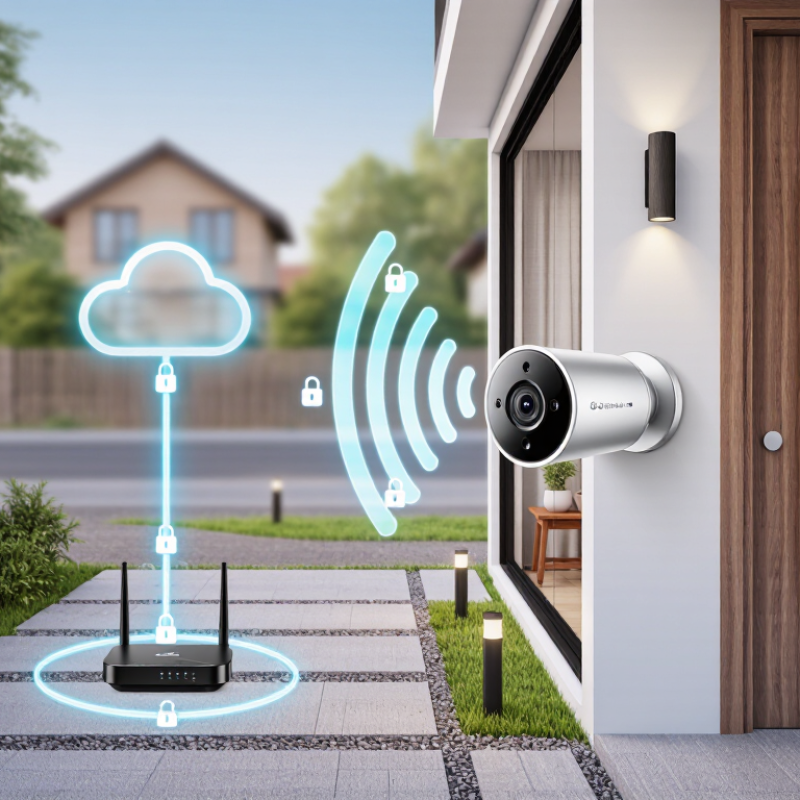
Wireless video security is a system that captures, transmits, stores, and protects video without relying on permanent cable connections. A typical setup includes a camera, wireless network, recorder or secure storage, viewing application, and user account controls. Each part affects safety. A strong camera cannot compensate for a weak home router.
The wireless connection carries video through radio signals, so encryption is essential. Secure authentication checks whether a person may access the camera or recordings. Multi-factor authentication adds another barrier. Automatic security updates repair known weaknesses, while access logs show unusual sign-ins or repeated failed attempts. Storage settings also matter. Local recording, encrypted cloud storage, or both can be selected according to privacy and operational needs.
Practical protection starts with a unique, long password for every account. Change default credentials immediately. Place cameras on a separate network when possible. Keep the router firmware current, disable unused remote access, and review connected devices monthly. A camera facing a private room deserves stricter settings than one watching a driveway. Physical placement matters too; someone should not easily reach the reset button or remove the memory card.
Small oversights remain common. People often secure the camera but ignore the router. That gap matters. Test alerts, account recovery, and recording access before an incident occurs. Review permissions when staff or household roles change. No setup is perfect, and convenience can quietly weaken protection.
Wireless video security describes cameras that send images through Wi-Fi or another radio link. The camera captures a scene, compresses the video, and transmits packets to a recorder or cloud service. A typical path looks simple: camera, access point, router, then storage. That path has several trust points. If one is weak, an attacker may intercept traffic, guess credentials, or access stored footage. Encryption protects data in transit, but it does not repair a reused password.
Many systems use TLS or similar encryption between the camera, viewing app, and server. Some devices also encrypt files at rest, protecting footage on a memory card or network recorder. Cloud storage usually copies recordings across controlled servers, while local storage keeps them inside the site. Each option has trade-offs. Cloud access can simplify backup, yet it depends on account security and internet availability. Local recording offers direct control, but a stolen recorder may expose unencrypted files. Convenience can mislead. I recommend checking both paths, not only the camera. This is where rushed installations often fail.
Use unique passwords, multifactor authentication, current firmware, and a separate network for cameras. Disable unused remote access and review login records regularly. Set retention limits, because unnecessary footage increases exposure and storage costs. Test recovery by exporting a short clip and restoring it later. A system can appear secure while backups remain forgotten. That uncomfortable gap deserves attention. No protection is permanent; review permissions after staff changes and investigate unusual data traffic promptly.
Wireless camera attacks often begin with ordinary weaknesses, not advanced tools. Attackers may guess reused passwords, exploit outdated firmware, abuse exposed remote access, or intercept poorly protected Wi-Fi traffic. They may also create fake login pages that imitate a camera portal. The 2024 Data Breach Investigations Report found vulnerability exploitation in 14% of breaches, rising 180% year over year. Cameras deserve the same attention as computers.
Watch for a camera that rotates without instruction, emits unfamiliar clicking sounds, or shows login activity at odd hours. Sudden bandwidth use can also matter. A changed field of view is a clear warning. Check the router’s connected-device list and review access logs when available. The 2024 Internet Crime Report recorded more than 880,000 complaints and reported losses above 16 billion dollars, showing how costly basic digital weaknesses can become. That figure does not measure camera incidents directly, but it gives useful context.
Use a unique password and enable multi-factor authentication. Update firmware through the verified administration page. Disable unused remote viewing and place cameras on a separate guest network. Encryption helps, but it is not magic. I have seen security checks stop after installation, which is a mistake. Recheck settings monthly, remove unknown users, and reset devices before changing ownership. Not every strange image means hacking; faulty power, weak Wi-Fi, or automatic updates can look similar. Verify before reacting.
Common Wireless Camera Hacking Methods and Warning Signs
The chart uses a normalized exposure score from 1 to 5 based on whether an attack can be performed remotely, requires weak or reused credentials, depends on outdated software, or targets an exposed network service. A higher score indicates greater defensive priority, not a measured breach rate.
Warning signs include unfamiliar logins, unexpected camera movement, changed settings, disabled recording, unusual network traffic, and repeated password-reset messages. Use unique passwords, multi-factor authentication, automatic updates, encrypted Wi-Fi, and disable remote access when it is not needed.
Wireless video security protects camera footage through Wi-Fi connections, mobile apps, and cloud services. That convenience also creates access points for attackers. A secure setup begins before installation. Place cameras away from public reach, and change the default administrator name and password immediately. Use a long, unique passphrase for every device. Never reuse your email password.
Enable multi-factor authentication when available. Then update the camera firmware, router software, and viewing application. Updates often repair known security weaknesses. Check the camera’s privacy settings carefully. Disable remote viewing if you never use it, and turn off unused features such as audio or automatic sharing. Keep cameras on a separate guest network when your router supports network isolation. This limits damage if one device becomes compromised.
Review login history and connected devices every month. Remove unfamiliar sessions, even if the activity seems harmless. Test alerts by signing in from an approved device and confirming that notifications arrive. Store recordings with restricted permissions, and avoid sending private footage through unsecured channels. A strong password is not enough. A forgotten old tablet can still expose an account. This is where many security plans fail. Recheck access after changing phones, household members, or network settings. If suspicious activity appears, disconnect the camera, preserve relevant logs, reset it safely, and contact the service provider or a qualified security professional.
| Step | Security Dimension | Main Risk | Recommended Measure | Verification Method | Priority |
|---|---|---|---|---|---|
| 1 | Default credentials | Attackers may use factory usernames and passwords published in manuals or exposed online. | Replace all default credentials before normal use. Use a unique, long password for every camera and recording system. | Confirm that default login details no longer work and that each device has a different password. | Critical |
| 2 | Multi-factor authentication | A stolen password may be sufficient to access a cloud account or management portal. | Enable multi-factor authentication for administrative, cloud, email, and remote-access accounts whenever supported. | Sign out and test account recovery with a second factor, such as an authenticator application or security key. | Critical |
| 3 | Firmware and software updates | Unpatched vulnerabilities can allow unauthorized control, data exposure, or malicious code execution. | Install security updates from the device manufacturer or service provider. Replace devices that are no longer supported. | Record the current firmware version, support status, and date of the latest security update. | Critical |
| 4 | Wireless encryption | Weak or outdated Wi-Fi protection can expose camera traffic and network credentials. | Use WPA3 where supported, or WPA2 with AES encryption. Avoid WEP, open Wi-Fi, and obsolete encryption modes. | Review the router security mode and verify that the camera is not connected to an unsecured network. | Critical |
| 5 | Network segmentation | A compromised camera may provide a path to computers, storage systems, or other sensitive devices. | Place cameras on a separate guest, IoT, or VLAN network and restrict communication to required services only. | Check firewall rules and confirm that the camera cannot reach unrelated personal or business devices. | High |
| 6 | Remote access | Internet-facing management pages and forwarded ports increase exposure to scanning and password attacks. | Disable direct internet access, UPnP, and unnecessary port forwarding. Use a trusted VPN with strong authentication when remote access is required. | Scan the router configuration for open forwarding rules and confirm that remote administration is disabled unless necessary. | High |
| 7 | Access permissions | Shared administrator accounts and excessive permissions make misuse difficult to detect and contain. | Create separate user accounts, apply least privilege, and give administrative rights only to trusted operators. | Review the user list regularly and remove former users, unused accounts, and unnecessary privileges. | High |
| 8 | Secure video transport | Unencrypted streams may be intercepted while moving between the camera, recorder, application, and viewer. | Enable encrypted web access and secure streaming options supported by the system. Avoid unprotected protocols for sensitive video. | Confirm that management pages use HTTPS and review the system documentation for encrypted video transport. | High |
| 9 | Router security | A compromised router can redirect traffic, expose devices, or change wireless settings. | Update router firmware, change the router administrator password, disable unused services, and secure the wireless network. | Review administrator accounts, DNS settings, firewall status, and connected-device lists. | High |
| 10 | Logging and alerts | Unauthorized logins or configuration changes may remain unnoticed without monitoring. | Enable login alerts, audit logs, device-change notifications, and time synchronization where available. | Perform a test login and verify that the event appears in the activity log or generates the configured alert. | Medium |
| 11 | Physical privacy | A camera may record private areas or continue recording when monitoring is not required. | Use privacy zones, physical shutters, power controls, or schedules. Position cameras to minimize unnecessary collection. | Review the field of view and confirm that privacy settings operate during the selected schedule. | Medium |
| 12 | Backup and incident response | A hacked system may lose recordings, evidence, settings, or access-control information. | Back up important configurations securely, define a retention period, and prepare steps to isolate, reset, update, and report a compromised device. | Test restoration and document who is responsible for disconnecting the camera, preserving logs, and resetting credentials. | Medium |
Wireless video security is not a one-time installation. It requires routine maintenance, careful access control, and documented updates. NIST Special Publication 800-40 Revision 4 recommends formal patch management for reducing known software risks. The 2024 Data Breach Investigations Report found a human element in 68% of breaches. Weak passwords and careless remote access still matter.
Begin with an accurate device inventory. Record each camera, firmware version, network address, and administrator account. Replace default passwords immediately. Use long, unique credentials and multi-factor authentication for remote management.
Separate cameras from office computers through network segmentation. This limits damage if one device is compromised. Disable unused cloud functions, ports, and guest accounts.
Schedule firmware checks monthly, then test updates on one camera before wider deployment. A failed update can interrupt recording.
Review login logs every week. Look for unfamiliar locations, repeated failures, and nighttime access. Store important recordings with restricted permissions and test restoration regularly.
Keep the management interface away from the public internet whenever possible. Physical details deserve attention too: a camera facing a bright window may produce useless footage, even when cybersecurity is strong.
A perfect setup is unlikely. I would still question old devices that cannot receive security patches, because convenience can quietly become exposure.
It captures, transmits, stores, and protects video without permanent cable connections. A typical system includes cameras, networking, storage, software, and user controls.
Every component matters. A strong camera cannot compensate for a weak router, exposed account, or poorly protected storage.
Use encrypted connections and secure authentication. Multi-factor authentication adds another barrier against unauthorized access.
Replace default credentials immediately. Use a long, unique password for every account. Never reuse important passwords.
Yes, when possible. Network separation limits damage if one camera becomes compromised.
Review firmware monthly and inspect login logs weekly. Test updates on one camera before updating the entire system.
Keep reset buttons and memory cards out of easy reach. Avoid pointing cameras directly toward bright windows, which can ruin footage.
Restrict recording permissions and test restoration regularly. Review accounts when household or staff responsibilities change.
Disable unused remote features, ports, and guest accounts. Keep management interfaces away from public internet access whenever possible.
No setup is perfect. I would question old devices that cannot receive security patches. Convenience can quietly create exposure.
Wireless video security combines cameras, wireless networks, recording equipment, user accounts, and software to monitor and protect video data without extensive cabling. These systems typically transmit footage through encrypted Wi-Fi or other wireless connections before storing it locally, on a private network, or in a secure cloud environment. Understanding how data moves and where it is stored is essential for identifying weaknesses and improving protection.
Common warning signs of camera compromise include unfamiliar login alerts, unexpected device activity, changed settings, unusual network traffic, or interrupted video feeds. To reduce these risks, use strong, unique passwords, enable multi-factor authentication, replace default credentials, encrypt wireless connections, limit user permissions, and separate cameras from other important devices. Learning how to secure wireless video streams from hacking also requires regular firmware and software updates, careful router configuration, disabling unnecessary remote access, reviewing account activity, and testing backups. Ongoing monitoring and scheduled security checks help maintain a reliable wireless video system over time.
HawkEye Camera